
aCar - Car Management, Mileage
Fuelly, LLCAuto & Vehicles
1.84.80K Reviews
- Version
- 5.6.12
- Installs
- 1.00M
- Age Rating
- Everyone
Screenshots
Our Review of aCar - Car Management, Mileage
 Analysis by Appyee
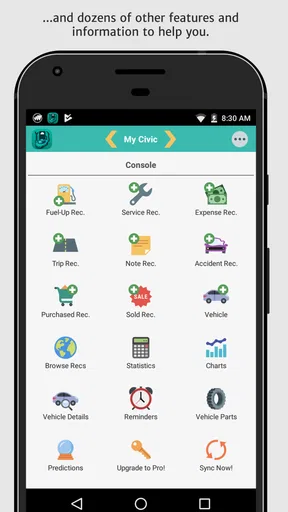
I think aCar is most useful when you want a dependable record of what happens to a vehicle, rather than another app that tries to do everything automatically. It is an auto and vehicle management app from Fuelly, LLC, built around keeping track of fuel, mileage, maintenance, trips, and expenses. The idea is straightforward: enter details as you go, then use that history to make better decisions about running costs and upkeep.
That makes the first few entries more important than the first impression. An empty log cannot tell you much, but a consistent record can help answer practical questions: how much a commute costs, when a service was last done, or whether a longer trip used more fuel than expected. I’d recommend it to someone who likes having those details in one place and is willing to keep them current. If you prefer a vehicle app that gathers information without regular input, this may feel like work.
Getting Started with aCar
Kicking things off, downloading and setting up aCar is a breeze. Available on both Android and iOS, it’s just a quick trip to your app store. Once installed, the app welcomes you with a clean and intuitive interface. I appreciated the step-by-step guide for entering initial data. You can log details like your vehicle's make, model, and year, which sets the foundation for everything else.
For a first-time user, I’d keep setup modest: add the vehicle you use most, make sure you know its current odometer reading, and begin recording new activity from that point. You don’t need to reconstruct every fill-up or repair from years ago to get value. If you have a recent receipt or service record close at hand, adding that information can give your history a useful starting point; otherwise, a clean record from today is better than guessing at old figures.
The app is free to install, is rated for Everyone, and its current version is 5.6.12, with Android support beginning at 6.0. It has more than a million installs, while its average rating is 1.7 from around 21,000 ratings and roughly 4,800 written reviews. That low average is worth taking seriously: I wouldn’t assume every person will find the experience trouble-free. Try entering a small amount of information first and see whether the logging routine suits you before committing to making it your complete vehicle archive.
Features That Stand Out
One of the coolest features is the mileage tracker. You can easily input your odometer readings, and the app provides insights into your vehicle's efficiency. It's like having a dashboard that tells you how your car is performing over time. I found myself checking it more often than I’d like to admit!
The practical value depends on entering readings consistently. For a meaningful comparison, record the odometer and fuel details at each fill-up rather than entering a cluster of transactions later from memory. A missed entry can make a stretch of driving harder to interpret, so I’d treat trends as helpful context, not a precise verdict on the car’s condition. Weather, traffic, route, and driving habits can all affect fuel use; the record helps you spot a change, but it cannot explain the cause by itself.
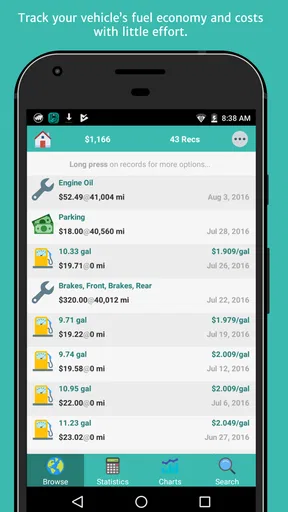
But that's not all. The app also excels in tracking expenses. You can log fuel purchases and see how much you're spending monthly. It even breaks down your cost per mile, which is super helpful for budget planning. If you're someone who loves data, the detailed charts and graphs will be right up your alley.
A useful way to use those figures is to compare like with like. Look at the same vehicle over similar periods, or separate routine fuel spending from an unusually expensive repair when reviewing your budget. If you share a household car, decide in advance who will enter each purchase; duplicate entries can distort totals just as easily as missed ones. I’d also keep receipts for major work until you’ve confirmed the record is complete, especially if you may need to refer back to the exact repair or cost later.
For someone who drives for work, trip records and expenses may help make personal tracking less fuzzy, but a log is not automatically a formal mileage report for an employer or tax filing. Check what your own organization requires before relying on it for official records. For ordinary budgeting, though, even a simple habit—recording a fill-up while the receipt is still in your wallet—can turn scattered spending into a useful picture.
Maintenance and Reminders
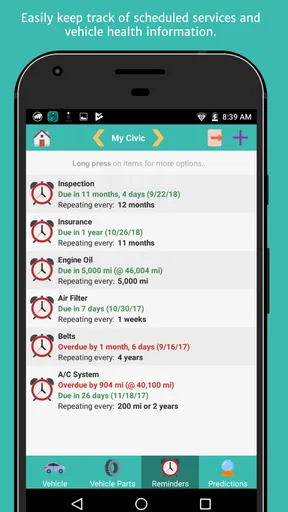
Another feature worth mentioning is the maintenance tracker. You can set reminders for oil changes, tire rotations, and any other regular upkeep your car requires. I was able to customize alerts, ensuring I never missed a service. Trust me, your future self will thank you for this!
The important first step is to base reminders on the schedule that applies to your own vehicle, rather than picking an interval simply because it seems familiar. Your owner’s manual or service advice is a better guide. If you buy a used car, ask for its service history and enter only the dates or odometer readings you can reasonably verify. That gives reminders a sound reference point and avoids treating an uncertain estimate as a confirmed service.
The app also allows you to enter repair details and costs, building a comprehensive history of your vehicle's health. This is particularly handy when trying to remember when you last replaced those pesky brake pads.
That history can also help when you speak with a mechanic. Instead of trying to remember whether a repair happened last winter or the winter before, you can consult your entries and describe what has already been done. For a used-car owner, keeping the invoice details and odometer reading together is especially useful when planning future maintenance or explaining the car’s history to a prospective buyer. The trade-off is that a record is only as dependable as the entries you make, so don’t add a repair as completed until you have the details right.
User Experience
The user experience is smooth, which is crucial for an app you’ll interact with frequently. The design is sleek, and navigation is straightforward. I didn’t encounter any hiccups or bugs, which speaks volumes about its reliability. Plus, it’s visually appealing, making it a joy to use daily.
Still, the main friction is not the idea of logging; it is remembering to do it at the right moment. A fill-up is easiest to record while you are at the pump or shortly afterward, when the amount and odometer are easy to check. Trying to enter several weeks of fuel stops from memory can create gaps and unreliable comparisons. I’d make the first successful action small: add one vehicle, record one real fill-up, and confirm that the entry appears where you expect before building a more elaborate history.
One thing I absolutely loved is the customizable reports. You can generate detailed summaries of your expenses and mileage over different time periods. Whether you’re a data nerd or just trying to keep your finances in check, this feature is a definite win.
Reports become more useful when you have a clear question in mind. For example, you might want to know whether fuel costs are rising month to month, or how much a particular vehicle costs to run over a period you choose. Avoid drawing a strong conclusion from a short or incomplete log; a report can organize what you entered, but it cannot fill in missing trips or explain an unusual expense. If you only need an occasional glance at spending, a basic notes app or spreadsheet may be less effort. aCar makes more sense when you want fuel, maintenance, trips, and expenses associated with the same vehicle record.
Where It Fits—and Where It Doesn’t
Compared with a paper notebook, aCar can make it easier to review entries and see patterns without manually adding up every receipt. Compared with a general budgeting app, its vehicle-centered records give fuel and maintenance a more natural home. But that focus is not a reason to move every household expense into it: if your goal is broad budgeting across bills, groceries, and savings, a dedicated finance tool will likely suit you better.
I’d also be cautious about treating it as a substitute for a vehicle’s built-in trip computer or a mechanic’s inspection. A trip computer may be more convenient for an immediate driving readout, while a professional inspection is needed to assess mechanical condition. aCar’s strength is the record you build over time: what you spent, what work you logged, and how mileage changed. It is a companion for remembering and reviewing, not a diagnostic service.
One realistic routine is to enter fuel after a weekly commute, then add a repair as soon as you receive the invoice. A few months later, you can review spending without searching through glove-box receipts or trying to remember which service came first. If another person also drives the car, agree on a simple handoff rule—such as whoever pays for fuel enters it—so the log stays coherent. That small household workflow matters more than filling every field on day one.
Costs, Fit, and a Sensible Next Step
aCar is free to download, with in-app purchases ranging from $0.99 to $14.99 per item. I’d start with the free experience and decide whether the habit and available tools are useful before spending anything. A purchase only makes sense if it addresses a need you have; don’t pay just because you hope it will solve inconsistent record-keeping. The app can organize your entries, but it can’t create accurate history when the underlying details are missing.
This is a good fit for owners with more than one vehicle to keep straight, drivers who want to understand fuel spending, and people who prefer having maintenance records ready when planning service. It may also help someone preparing to sell a car, provided they have been careful not to present estimates as documented repairs. I’d skip it if you rarely track expenses, dislike manual entry, or mainly want navigation, live vehicle diagnostics, or an all-purpose budget manager.
Final Thoughts
In conclusion, aCar - Car Management, Mileage is a must-have for anyone looking to streamline their vehicle management. It's packed with features that cater to everyday drivers and car enthusiasts alike. Sure, it requires a bit of discipline in logging data, but the payoff is immense in terms of insights and savings.
If you're ready to take control of your car's expenses and maintenance, give aCar a spin. It's like having a co-pilot that keeps your ride smooth and your wallet happy. Cheers to smarter driving!
Verdict
Strengths of aCar - Car Management, Mileage
- Intuitive interface for easy navigation.
- Tracks mileage and fuel efficiency accurately.
- Comprehensive service reminders.
- Supports multiple vehicles.
- Customizable expense categories.
Limitations of aCar - Car Management, Mileage
- Limited features in the free version.
- Ads may be intrusive for some users.
- Initial setup can be time-consuming.
- No real-time GPS tracking.
- Lacks cloud backup option.
Similar Picks in This Category
View All
Android Auto
Google LLC4.1

maxim — order a taxi & food
PT. SITO4.7

Штрафы ГИБДД: проверка с фото
Pays LLC – Штрафы ГИБДД4.7

Номерограм – проверка авто
Авто Ассист4.8

Дром Авто
Дром4.9

Frequently Asked Questions
What features does aCar offer for vehicle management?
aCar provides comprehensive features for tracking fuel mileage, expenses, and maintenance schedules. Users can log fill-ups, services, and expenses to monitor their vehicles' performance and cost efficiency. The app also offers reminders for upcoming services and detailed statistics, making it a robust tool for car management.
Is aCar available on both Android and iOS platforms?
Currently, aCar is available exclusively for Android devices. Users can download it from the Google Play Store. While an iOS version is not available, Android users praise its functionality and ease of use, making it a popular choice for vehicle management.
How user-friendly is the interface of aCar?
aCar offers a user-friendly interface with intuitive navigation. The app is designed to simplify data entry and retrieval, making it accessible even for users who are not tech-savvy. Its clean layout ensures that tracking and managing vehicle information is straightforward and efficient.
Does aCar support multiple vehicles?
Yes, aCar supports multiple vehicles, allowing users to track and manage various cars within a single app. This feature is particularly beneficial for families with several vehicles or individuals who manage a fleet. Users can easily switch between different vehicles to update or review their data.
Can aCar generate detailed reports and statistics?
aCar excels in providing detailed reports and statistics. Users can generate comprehensive reports on fuel efficiency, expenses, and maintenance history. These insights help users understand their vehicle’s performance over time and can be exported for further analysis, making aCar a valuable tool for informed decision-making.
